

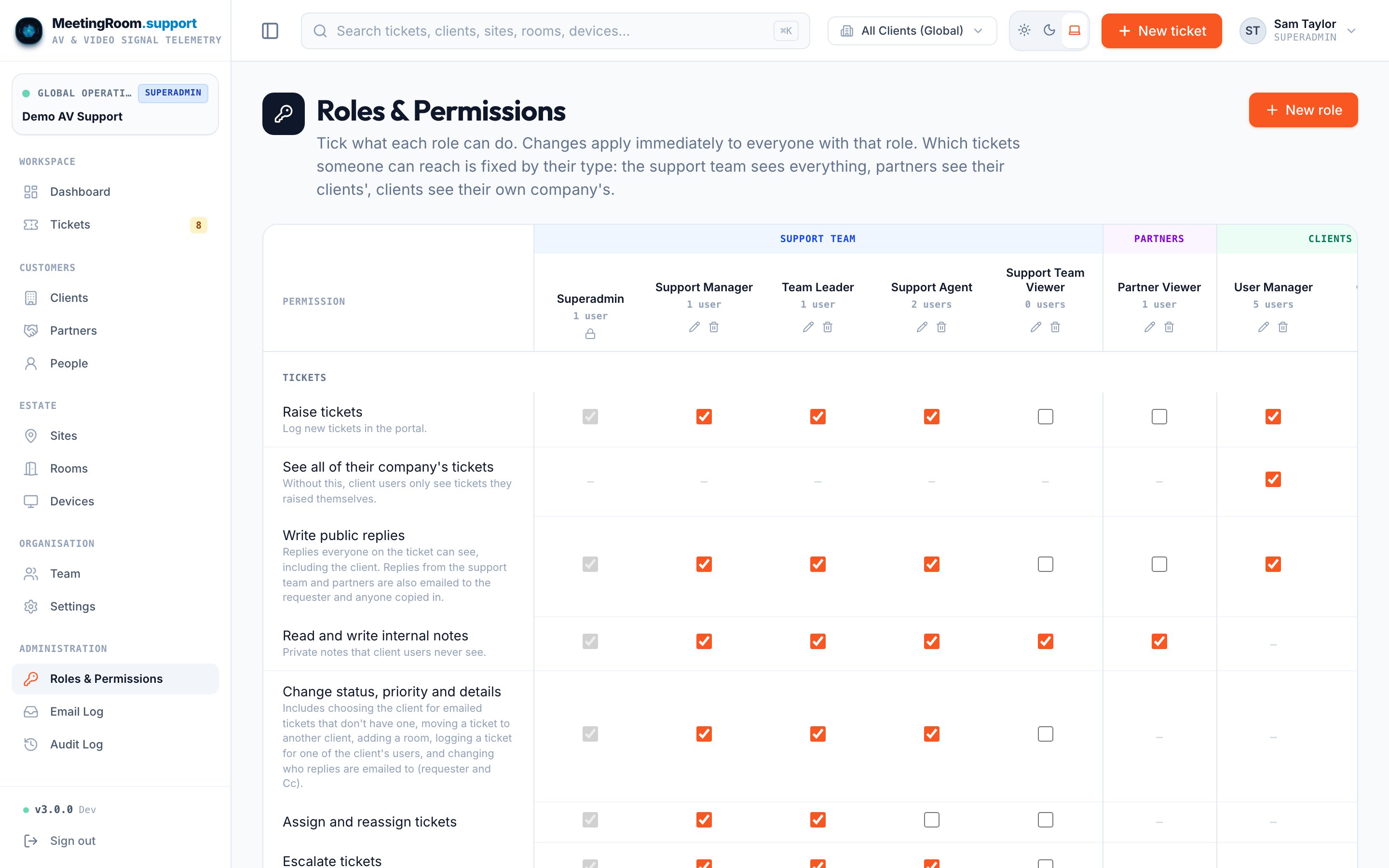
Open Roles & Permissions under Administration. Only Superadmins have this page by default. The Roles & Permissions grid with a column per role and a row per permission Each column is a role, grouped by tier, with how many users have it. Each row is a permission, with a short description under its name. Tick or untick a box and the change applies straight away to everyone with that role. Which tickets someone can reach is fixed by their tier, not their role: the support team sees everything, partners see their clients’, and clients see their own company’s. Permissions decide what they can do with what they can reach.

The default roles

Permissions

Boxes shown as a dash can’t be ticked for that tier: for example, client roles can never change ticket status. Your organisation’s plan comes on top of roles. A permission for a feature your plan doesn’t include (custom roles, partners, device monitoring) is taken away from everyone, whatever their role says.

Adding a role

Select New role, give it a name and tier, and tick its permissions. Use this when a default role is close but not right, such as a support agent who may also delete junk tickets. Editing and adding roles needs a plan with custom roles. You can’t create or edit a role with permissions you don’t have yourself.